Securing Windows Access: A Step-by-Step Guide to Using Boundary and Vault for Credential Management
Introduction
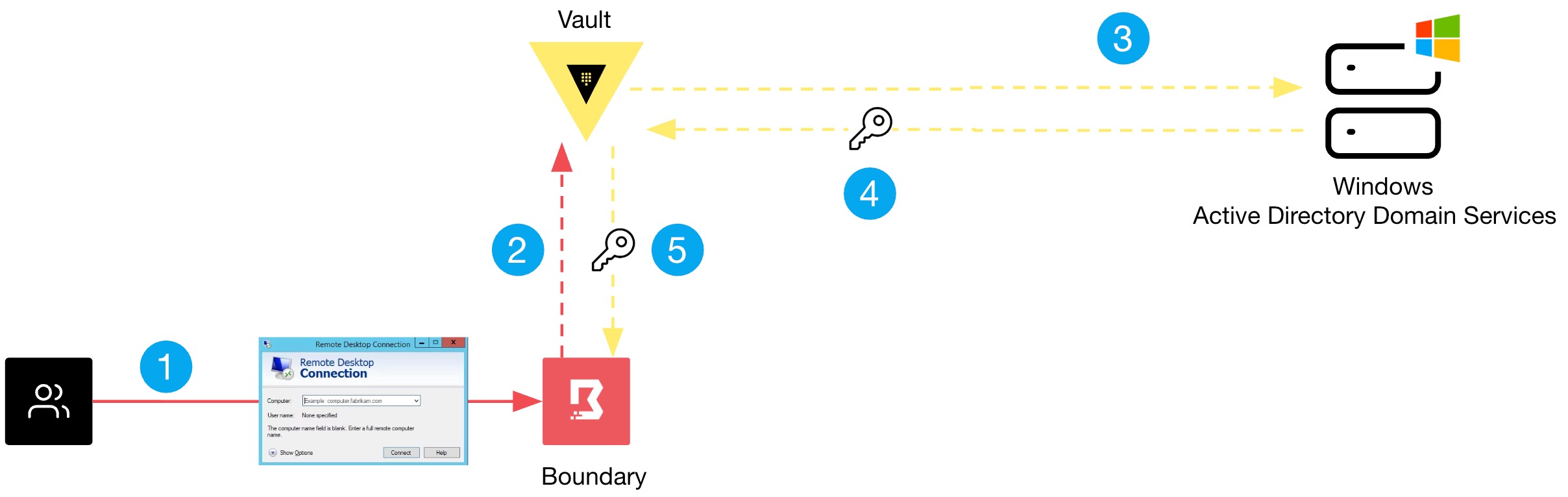
Many organizations still struggle with remote access security in Windows environments, relying on static credentials and overly broad network access through VPNs. These outdated practices expose critical servers and workstations to credential theft and lateral movement. By combining HashiCorp Boundary and Vault, you can replace static passwords with dynamic, just-in-time credentials and enforce identity-based access policies. This guide walks you through the essential steps to mitigate credential exposure without the complexity of traditional VPNs or manual rotation processes.
What You Need
- HashiCorp Vault – installed and configured (recommend version 1.12+) with a secrets engine capable of generating dynamic credentials (e.g., Active Directory or SSH).
- HashiCorp Boundary – at least one controller and worker deployed (version 0.12+).
- Windows Target Machines – Windows Server 2016 or later, or Windows 10/11 workstations that you want to secure.
- Administrative Access – permissions to configure Vault secrets engines, Boundary targets, and Windows local/domain accounts.
- Network Connectivity – ensure Boundary workers can reach Windows machines on RDP (port 3389) and that Vault is reachable by Boundary controllers.
- Domain or Local Accounts – a dedicated service account or domain user that Vault will manage (never reuse existing privileged accounts).
Step-by-Step Instructions
Step 1: Inventory Current Credential Risks
Before implementing new tools, identify all Windows servers and workstations using static or shared credentials. Document which accounts are local administrators, which are domain accounts with long-lived passwords, and any break-glass credentials. This inventory will help you prioritize targets for dynamic credential rotation. Look for accounts that have not been rotated in over 90 days — those are high-risk.
Step 2: Set Up Vault Dynamic Secrets Engine
Configure Vault to generate temporary, time-limited credentials for your Windows targets. For Active Directory environments, enable the Active Directory secrets engine. Vault will rotate the password of a dedicated service account and then use that account to create dynamic credentials on demand. If you manage local accounts, consider using the KV secrets engine with automatic rotation scripts (or a custom plugin). Ensure Vault’s audit logging is enabled and that you have defined a default lease TTL (e.g., 1 hour) to enforce short-lived access.
Step 3: Configure Boundary for Identity-Based Access
Deploy or update your Boundary cluster. Create targets for each Windows machine or group of machines (via IP addresses or DNS names). Instead of granting broad network access, define roles that map users or user groups to specific targets. Each role must specify which credential store to use (the Vault secrets engine from Step 2). Boundary will authenticate users via OIDC, LDAP, or built-in authentication, then fetch credentials from Vault automatically when a session is initiated.
Step 4: Integrate Vault with Boundary Credential Stores
In Boundary’s admin interface, add a new credential store of type Vault. Provide the Vault server address, a token with appropriate permissions (read and generate credentials), and the path to your secrets engine. Then attach this credential store to the targets created in Step 3. Test the integration by initiating a session from Boundary — the system should dynamically request a new password from Vault and present it to the user (or auto-fill it into the RDP client).
Step 5: Implement Just-in-Time Access Policies
Define policies that limit access to only what is necessary. For each target, set session time limits (e.g., 1 hour) and enforce idle timeout (e.g., 15 minutes). Also create a break-glass policy for emergencies: a separate Vault secrets engine with elevated credentials but requires multi-party approval (e.g., two Boundary administrators must authorize). Use Boundary’s session recording feature to audit all RDP sessions.
Step 6: Automate Credential Rotation Verification
Ensure that Vault rotates the base service account password frequently (e.g., every 24 hours) and that no static backups exist. Schedule periodic tests where your team attempts to use old credentials — they should fail. Implement alerts in Vault and Boundary to notify your security team if any credential generation or session initiation fails unexpectedly.
Tips for Success
- Start small: Pilot this setup with a single non-critical Windows server before expanding to all production systems.
- Use dedicated service accounts: Never reuse existing domain admin or local admin accounts as the Vault-managed account. Create a new, least-privileged account specifically for credential rotation.
- Monitor audit logs: Regularly review Vault and Boundary audit logs to detect anomalous credential requests or session initiations.
- Combine with MFA: Even though credentials are dynamic, add an additional layer by requiring multi-factor authentication in Boundary’s auth method.
- Document break-glass procedures: Ensure your team knows how to request emergency access without relying on static passwords.
- Test rollback: In case of a Vault outage, have a manual process to restore access (e.g., pre-encrypted break-glass tokens stored offline).
By following these steps, you replace static administrative credentials with automatically rotating secrets and eliminate the broad network access of traditional VPNs. Your Windows environment becomes significantly harder to penetrate and easier to audit — without sacrificing productivity. For more details on specific configuration commands, refer to the official Boundary documentation and Vault documentation.